
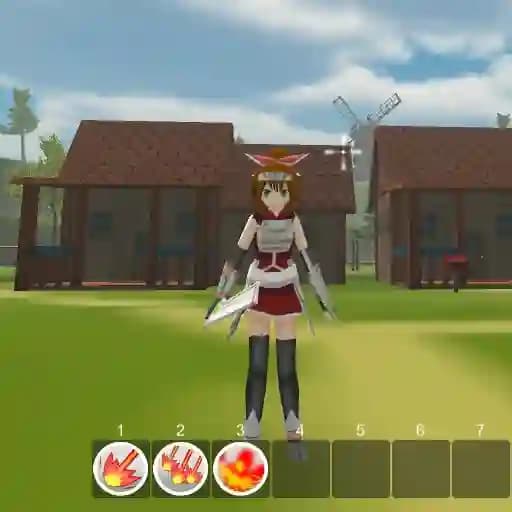
Game Overview
What is Valkyrie RPG?
Valkyrie RPG is an engaging RPG game developed by JulGames. It offers a fun and immersive experience with multiple worlds to explore, various enemies to battle, and quests to complete. Players can enjoy a mix of adventure and role-playing elements as they journey through the game's expansive universe.
Game Features
• Fun RPG Gameplay: Engage in classic RPG mechanics with character progression and development.
• Multiple Worlds: Explore diverse and vibrant environments, each with unique challenges and secrets.
• Multiple Enemies: Battle a variety of foes, each requiring different strategies to defeat.
• Quests: Complete quests to advance your character and uncover the story.
• Movement Controls: Use WASD to move and navigate the game world.
• Combat System: Attack with a click and use skills to overpower enemies.
• Character Progression: Upgrade your skills and weapons to enhance your gameplay experience.
How to Play Valkyrie RPG?
- Move your character: Use the WASD keys to navigate through the world.
- Jump: Press the Space bar to jump over obstacles.
- Attack: Click the left mouse button to attack enemies.
- Use Skills: Press keys 1-8 to use different skills during combat.
- Access Status Window: Press C to view your character's stats and progress.
- Open Inventory: Press I to manage your items and equipment.
- Skill Tree: Press K to upgrade and unlock new abilities.
- Quest Log: Press Q to track your current quests and objectives.
- Sprint: Hold Shift to move faster.
- Dodge Roll: Double-tap WASD to perform a dodge roll and avoid attacks.
- Save/Load Menu: Press Esc to save your progress or load a previous game.
- Switch Weapon: Press R to change your weapon.
- Help: Press H to access in-game help and controls.
Frequently Asked Questions
What are the controls for movement?
The controls for movement are WASD for walking, Space to jump, and Shift to sprint. You can also double-tap WASD to dodge roll.
How do I attack enemies?
To attack, simply click the left mouse button. You can also use skills by pressing keys 1-8 to gain an advantage in combat.
How do I save my progress?
Press Esc to open the Save-Load menu, where you can save your current game or load a previous save.
What is the purpose of the Skill Tree?
The Skill Tree (accessed by pressing K) allows you to upgrade your character's abilities and unlock new skills to enhance your gameplay experience.
Can I change my weapon?
Yes, you can switch weapons by pressing R. This can be useful for adapting to different combat situations.
How do I view my quests?
Press Q to open the Quest Log, where you can track your current objectives and progress through the story.