
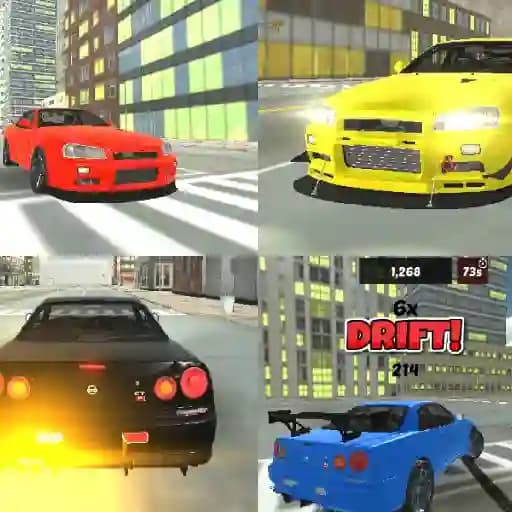
Game Overview
What is Skyline R34 Drift 3D?
Skyline R34 Drift 3D is a 3D racing and drifting game centered around the iconic Nissan Skyline GT-R R34. It offers a combination of tuning, racing, and drifting experiences, providing players with the freedom to customize and drive their car as they wish. The game also features a new Drift Challenge mode, making it a standout title in the Drift 3D series.
Game Features
- Iconic Car: Play with the legendary Nissan Skyline GT-R R34.
- Tuning Options: Customize your car to suit your driving style.
- Multiple Modes: Includes a Drift Challenge mode for expert-level drifting.
- Realistic 3D Graphics: Immersive driving experience with detailed visuals.
- Slow-Motion Mechanics: Add a cinematic touch to your drifts.
How to Play Skyline R34 Drift 3D?
- Use the arrow keys or WASD to control the car's movement.
- Press the spacebar to activate the handbrake for tighter turns and drifts.
- Toggle slow-motion using the G key for precise control during drifts.
- Turn on the car's lights with the L key for added realism.
- Use Q, E, and Z to activate the car's indicators.
- Record your gameplay with the R key and replay it using the P key.
Frequently Asked Questions
What makes Skyline R34 Drift 3D unique?
Skyline R34 Drift 3D stands out for its focus on the iconic Nissan Skyline GT-R R34 and the addition of a Drift Challenge mode, making it a must-play for drifting enthusiasts.
Can I customize my car in the game?
Yes, the game allows you to tune and customize your car to match your driving preferences.
How do I record and replay my gameplay?
Use the R key to record your gameplay and the P key to play back the recorded session.