
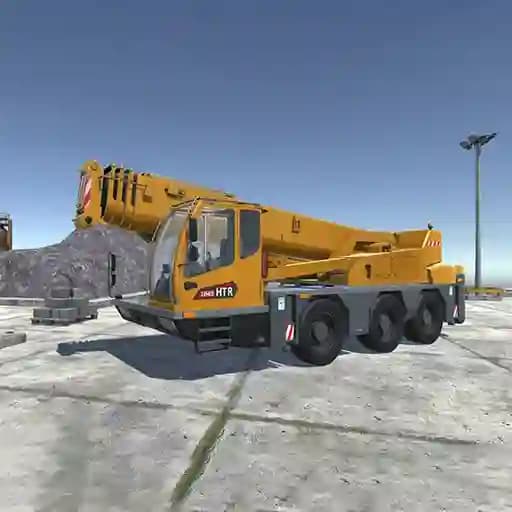
Game Overview
What is Heavy Crane Simulator?
Heavy Crane Simulator is a simulation game where players take on the role of operating a heavy crane and a truck. The game focuses on realistic crane and truck operations, allowing players to experience the challenges of controlling heavy machinery. With detailed controls and multiple features, the game provides an immersive experience for those interested in construction and logistics simulation.
Game Features
• Realistic Crane and Truck Operations: Operate a heavy crane and a truck with detailed controls for driving, crane movement, and cargo management.
• Multiple Control Options: Use keyboard and mouse controls for precise crane and truck operations.
• Camera Controls: Adjust the camera view to get the best perspective on your surroundings and operations.
• Support Systems: Activate horizontal and vertical supports to stabilize your crane during operations.
• Machine Selection Menu: Switch between different machines to suit your operational needs.
• Instructional Support: Access in-game instructions to master the controls and gameplay mechanics.
How to Play Heavy Crane Simulator?
- Drive the Truck: Use WASD keys to move the truck forward, backward, left, or right. Press Space to brake and Left Shift to accelerate.
- Activate the Crane: Press Y to toggle the crane on/off.
- Control the Crane: Use LMB + A/D to rotate the crane, LMB + Q/E to move the crane forward or backward, and LMB + W/S to lift or lower the crane.
- Adjust the Hook: Use Left Shift + W/S to raise or lower the hook.
- Activate Supports: Press U to activate the support block. Use LMB/RMB + Z for horizontal support and LMB/RMB + X for vertical support.
- Camera Controls: Use the mouse to rotate the camera and the mouse wheel to zoom in/out.
- Access Menus: Press Tab to open the machine selection menu and I to view instructions.
Frequently Asked Questions
What is the main objective of Heavy Crane Simulator?
The main objective is to operate a heavy crane and truck to perform tasks like lifting, moving, and managing cargo in a realistic simulation environment.
How do I activate the crane and hook?
Press Y to toggle the crane on/off. To activate the hook, press K. Use Left Shift + W/S to control the hook's height.
Can I switch between different machines?
Yes, press Tab to open the machine selection menu and choose the desired machine for your operation.