
Game Overview
What is GTR Drift Legend?
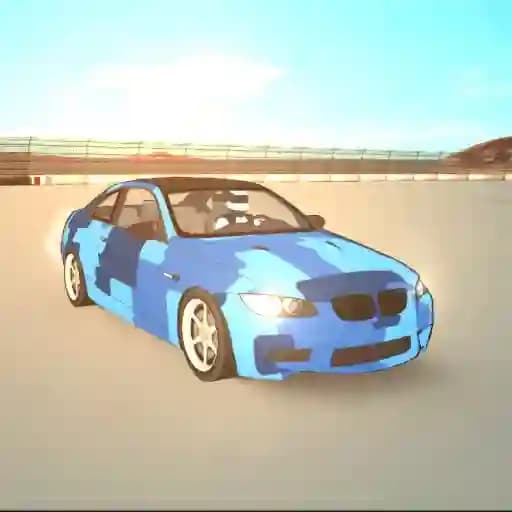
GTR Drift Legend is a high-octane 3D racing game focused on the thrilling world of drifting. Players get to experience realistic drifting mechanics and stunning graphics while competing on 6 unique drift tracks. The game features 19 highly detailed sports cars, including iconic models like the GTR, E46M3, and Supra. With its realistic driving experience and exciting gameplay, GTR Drift Legend offers a mix of speed, style, and precision for drift enthusiasts.
Game Features
• 19 Unique Cars: Choose from a wide range of realistic drift cars, each with its own unique characteristics.
• 6 Drift Tracks: Master your drifting skills on diverse and challenging tracks.
• Realistic Drifting System: Enjoy a lifelike drifting experience with precise physics and controls.
• Stunning Graphics: Immersive visuals with detailed car models and environments.
• Single-Player Mode: Compete against yourself to achieve the best drift score and unlock new content.
• Slow Motion Option: Execute stunning drifts in slow motion for a cinematic experience.
• Multiple Camera Angles: Switch between driver's POV, rear POV, and cinematic views.
• Record and Playback: Review your best moments with the game's built-in recording feature.
• Customization Options: Personalize your experience with car customization and camera preferences.
How to Play GTR Drift Legend?
- Start the Game: Launch GTR Drift Legend and select your desired car and track.
- Master the Controls: Use the following keyboard controls to play:
- Movement: Arrow keys or W, A, S, D.
- Handbrake: Space.
- Change Camera: C.
- Gear Shift Up: Left Shift.
- Gear Shift Down: Left Control.
- Neutral Gear: N.
- Boost/NOS: F.
- Slow Motion: G.
- Look Back: B.
- Record: R.
- Playback: P.
- Drift Successfully: Perform drifts by combining speed and precise steering. Use the handbrake to initiate tighter drifts.
- Score Points: Earn points by maintaining long drifts and achieving high speeds.
- Unlock Content: Achieve high scores to unlock new cars and tracks.
- Experiment with Features: Use slow motion to refine your drifts, and switch camera angles for different perspectives.
Frequently Asked Questions
How do I start playing GTR Drift Legend?
To start playing, select your preferred car and track, and use the movement controls (Arrow keys or W, A, S, D) to begin driving.
How do I perform a drift?
To drift, press the Space key to activate the handbrake while steering. This will help you initiate a drift and maintain control.
Can I change the camera view during gameplay?
Yes, you can switch between different camera angles by pressing the C key. This includes driver's POV, rear POV, and cinematic angles.